

Volunteer Equipment Check-Out Standard Operation Procedure
Last Updated November 2, 2024
All volunteer equipment is located inside the Visitor Center for check-out.
Staffing
Volunteers can check-out radios and equipment at the Visitor Center Information Desk from the volunteer or ranger at the desk. CNMF Store staff are not available to help with this. If no one is available there is a self-check-out option (see below). Check-out forms should be filled out accordingly by VIPs. This area will be checked daily and maintained by the ranger on duty. Rangers will also be checking radios weekly to make sure they are working properly, as well as printing the Daily VIP Schedule.
Our goal is to make sure that the Visitor Center is accessible to you all during park hours, every day from 9 am to 5 pm. If the Visitor Center is inaccessible, radio 799 for assistance, or knock on the IEV office window next to the picnic table behind the screen door. As a result, we are currently recruiting volunteers for the Visitor Center. Please email cabr_volunteers@nps.gov if you are interested in greeting other volunteers, distributing volunteer equipment, swearing-in exciting Junior Rangers, and answering visitor questions about the park!
Entrance Station
Entrance Station staff does not need to radio 799 to give a notification of your arrival. Show the Entrance Station Ranger on duty your hat, or another VIP uniform item, or let them know you are here for a VIP shift. VIPs must make sure they wait for a ranger on duty at the entrance station to give them an okay before you proceed into the park. Only use the employee lane when on site for official VIP service.
Accessibility notes for volunteers who need mobility support: If you need assistance checking-out a radio, be sure to let the Entrance Station rangers know to radio 799 with your name and duty for the day. The ranger on duty will meet you at the traffic circle with your radio and any additional necessary equipment.
Visitor Center Organization: Where Is Equipment Located?
If no one is available in the Visitor Center to check-out your equipment for you, it is important that VIPs understand the process and where things are located.
Last cabinet on the right
As you enter the Visitor Center and face the desk, there is an “island” of cabinets in front of you. The TV with the daily schedule is on this island. The last cabinet all the way on the right labeled “VIP Radios” houses most, if not all, of the equipment you will need to check out.
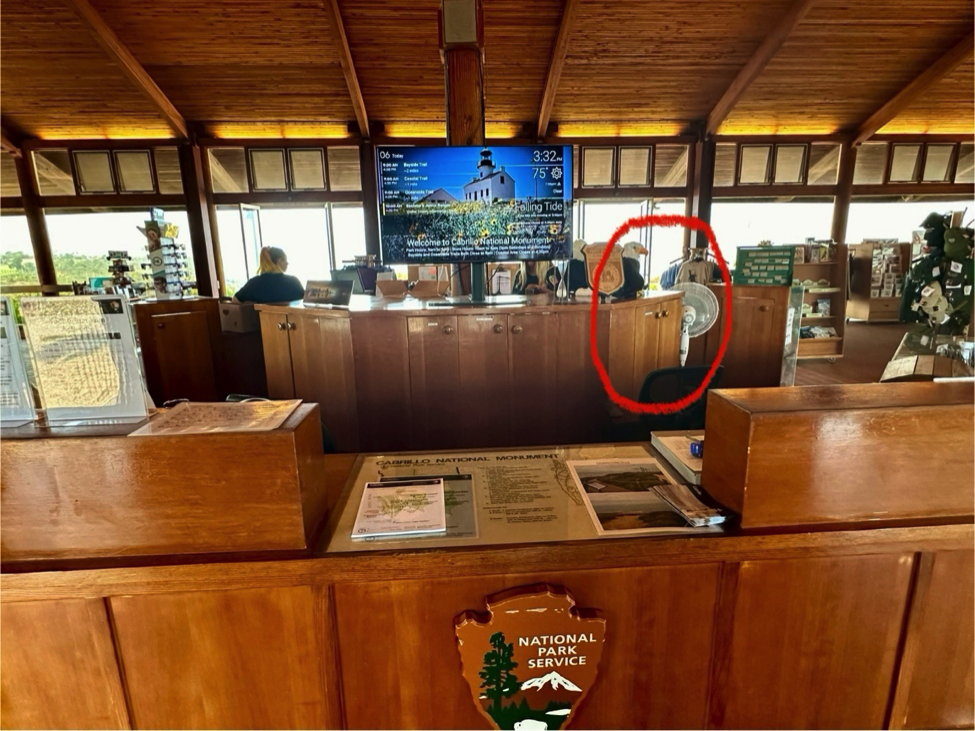
Image descriptions: The Visitor Center Information Desk and center “island” of cabinets. There is a TV at the center of the “island” showing the daily park schedule. The “island” cabinet doors are closed and the cabinet furthest to the right is circled in red, indicating where VIP Equipment is stored.
In this cabinet, you can find all the following:
| Top Sliding Shelf:VIP Radios | Bottom Sliding Shelf:TPERP VIP Radios National Park Service Vehicle Magnets |
| Left Door:VIP Equipment Check-Out Form VIP Interpretive Contacts Form | Right Door:TPERP Keys |
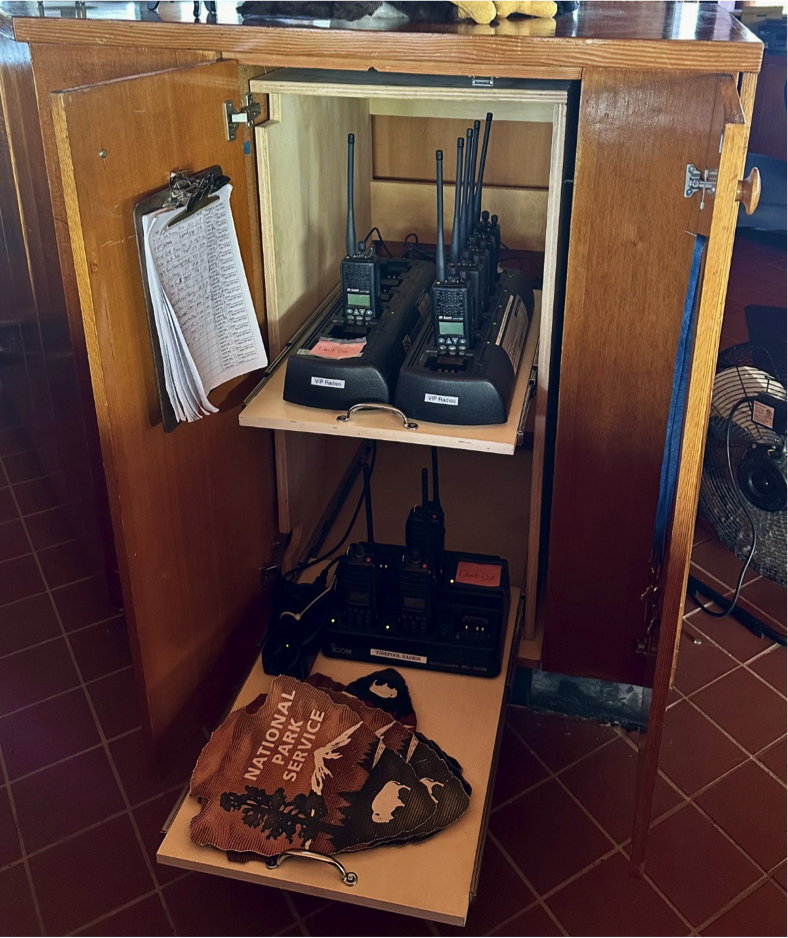
Image descriptions: The inside of the cabinet circled in the previous picture. Two sliding shelves are pulled out. The top shelf contains VIP radios, the bottom shelf contains TPERP VIP radios and National Park Service Vehicle Magnets. The inside of the left door has a clipboard with the VIP Equipment Check-Out Log hanging on it. The inside of the right door has the TPERP Keys hanging on it.
Cabinet directly across VIP Radio cabinet
As you are facing the cabinet which contains the VIP radios, the cabinet directly behind you (in other words, the cabinets immediately across from the VIP radios cabinet), contains a clipboard with the daily VIP Schedule as well as Roving Supplies.

Image description: (Left) Cabinet directly across VIP Radios cabinet with closed doors labeled, “VIP SCHEDULE,” “ROVING SUPPLIES.”
(Right) The inside of the same cabinet with a clipboard that has the Daily VIP Schedule on it, and roving backpacks on the top shelf. On the bottom shelf another backpack, an orange safety vest, and gloves.
Cabinet Below Television – New VIP Vests (Less Than 40 Hours)
As you face the Visitor Center Information Desk, below the television showing the daily park schedule, there is a cabinet labeled, “New VIP Vests.” In this cabinet you can find blue VIP Vests in different sizes.
These vests are for newer volunteers on their way to completing their first 40 hours of service at Cabrillo National Monument. Please be sure to check-out a vest at the beginning of your shift and check-in the vest at the end of your shift by filling out the VIP Equipment Check-Out Form which is in the cabinet with the VIP Radios. Please also hang vest back up in the section that corresponds to the vest size.
NOTE: Once you have completed and logged 40 hours onto Volgistics, please be sure to check-in with your VIP supervisor for your official volunteer uniform and name tag! 😊
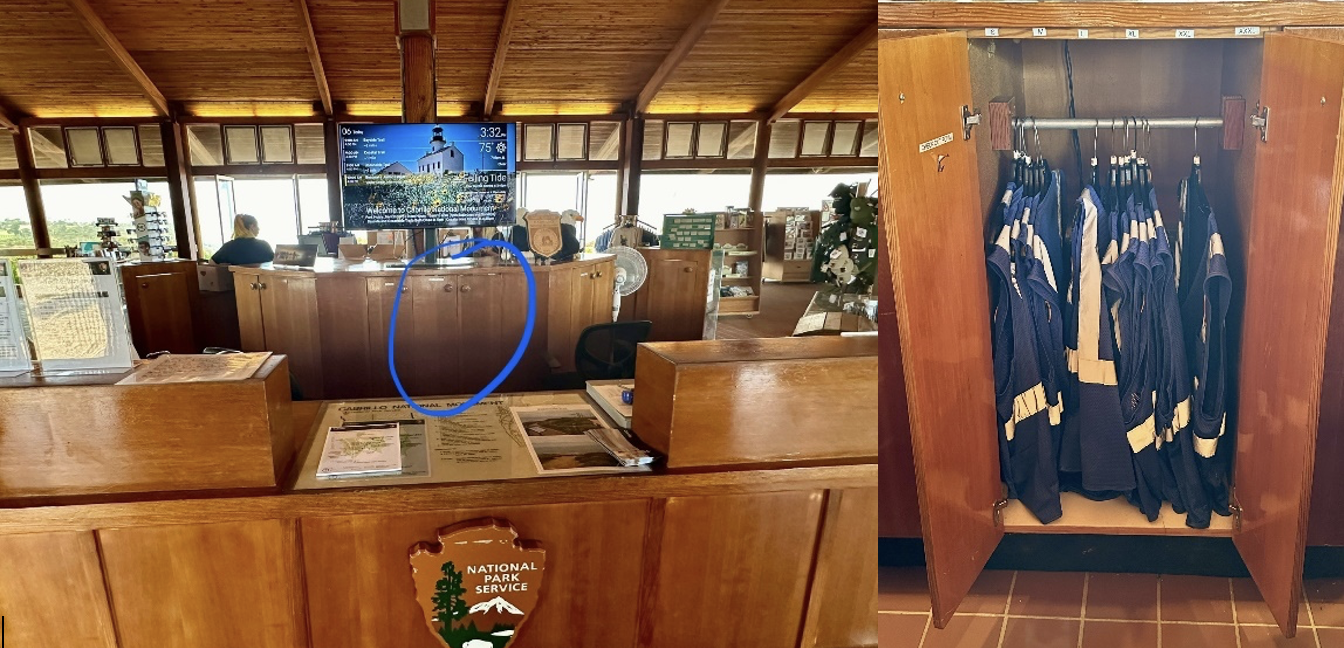
Image description: (Left) The Visitor Center Information Desk and center island of cabinets. There is a TV at the center of the “island” showing the daily park schedule. The “island” cabinet doors are closed and the cabinet in the center below the TV is circled in blue, indicating where VIP Vests are stored.
(Right) The inside of the cabinet. Many blue vests with silver reflective lines are hanging off a rack.
Self-Check-Out Process When No Is One Stationed at the Visitor Center
Beginning Of Shift
- Grab a radio from the radio charger on the top shelf of the VIP Radios cabinet. A green light indicates the radio is fully charged.
- Fill out the VIP Equipment Check-Out Form with the date, your name, your duty, check-out time, and radio number.
- If you are checking out a VIP Vest, also check the “New VIP Vest” box on the VIP Equipment Check-Out Form.
- Be sure to turn on your radio at the beginning of your shift.

Image description: A partial image of a filled-out VIP Equipment Check-Out Form.
Special Case: TPERP
- Grab radio from the radio charger on the lower shelf of the VIP Radios cabinet.
- Fill out same VIP Equipment Check-Out form as indicated above.
- If you are checking out a VIP Vest, also check the “New VIP Vest” box on the VIP Equipment Check-Out Form.
- If grabbing a TPERP key, be sure to also check the “TPERP Key” box on the VIP Equipment Check-Out form.
- Don’t forget your vehicle magnet! Just one to place on the door that faces the road down at the tidepool designated parking (Lot 1), so LE can identify VIP/staff vehicles.
Note: On busy days, TPERP supervisor or ranger on duty will be sure to plan for designation of TPERP equipment on the Daily VIP Schedule. This will also help with crowding when multiple VIPs are scheduled to come in at the same time.
Special Case: Rovers
- Follow the “Beginning of Shift” instructions indicated above.
- If helping with cleaning, don’t forget the roving backpack from the “Roving Supplies” cabinet!
- Binoculars and clickers are also available in the cabinet.
Special Case: Shorebird Monitoring
- Follow the “Beginning of Shift” instructions indicated above.
- Don’t forget your monitoring backpack and vehicle magnet (just one, as stated under the TPERP section)! Otherwise, all equipment that previously lived in the breakroom locker has been relocated to the Visitor Center.
Special Case: Science Explorer’s Club (SEC)
- Follow the “Beginning of Shift” instructions indicated above.
- Please be sure to radio 799 with assistance with grabbing the SEC cart from the auditorium.
End of Shift
- Make sure your radio is turned off at the end of your shift.
- Return your radio to the correct charger. TPERP radios go on the lower shelf, all other radios go on the top shelf. A light turning on indicates the radio has been properly placed back onto a charging slot.
- Return any additional equipment (e.g. VIP Vest, TPERP Key, National Park Service Vehicle Magnets)
- Update your VIP Equipment Check-Out Form entry with the time in which you are returning your radio and other equipment you may have checked out.
- If returning VIP equipment after the Visitor Center has closed (4 pm weekdays, 5 pm weekends), please radio 799 to open the Visitor Center for you. If they cannot open the Visitor Center, please leave equipment in the large plastic bin placed on the table outside the Visitor Center entrance where the passport stamps are currently located.
Accessibility notes for volunteers who need mobility support: If you need assistance returning your equipment, be sure to radio 799 to let them know you are at the traffic circle. The ranger on duty will come out to meet you at the traffic circle to collect your equipment.
“799, 540 (your name) – pause for response– Returning radio at the traffic circle.”
Special Case: All VIP Positions Under Interpretation
Example: Military History (including bunker), Cleaning-Interpretation, Guided Walks, and Roving
- Follow the “End of Shift” protocol as indicated above.
- Return any additional equipment used to its proper location.
- Fill out the Interpretive Contacts form to mark the number of visitor interactions you had.
Note: Visitor Center VIPs will continue to use the Daily Visitor Center Contact Report for tracking statistics.
Note: TPERP volunteers will continue to use the TPERP Interpretive Contacts form inside the TPERP shed. Please do not use the one inside the Visitor Center.
New Protocol Exemptions
- VIPs who do not usually use radios because their VIP supervisor is in the field with them (example: Weed Warriors, Greenhouse).
- VIPs who get their radios from their workstation (example: Entrance Station, Facilities).
Last revised 5-Nov-24
 CNM VIP Voice